News
Account
My Account
Create Account
Lost Account
Play Online
Downloads
Community
Forum
Weekly Events
Offline Trader
Advanced Fishing
Character Search
Downloads
Players Online
Highscores
Polls
Houses
Guilds
City Wars
Recent Deaths
Wiki
Shop
Buy Points
Shop
Support
Site Language
English
Português
Español
Polski
Create Account
Downloads
974 Players Online
Aug 02 2026
New web client available! Play on Windows, Android, and iPhone without needing to install anything. Access via the "My Account" panel.
Jul 24 2026
New task system with better rewards and event tasks. Visit NPC Tasker with updated Universal Client
Jul 23 2026
New monsters released: Holy Inquisitor Reset 4000 and Gunsmoke Reset 4200, refinement at Rigel statue, hunt 6.
Jul 21 2026
New Antibot for Bosses: Khufu, Slenderman, and Carnage. Answer a visual challenge to access the rooms.
Apr 08 2026
Add a depot to your house with the House Depot Pack from the Shop. Limit of 1 per house.
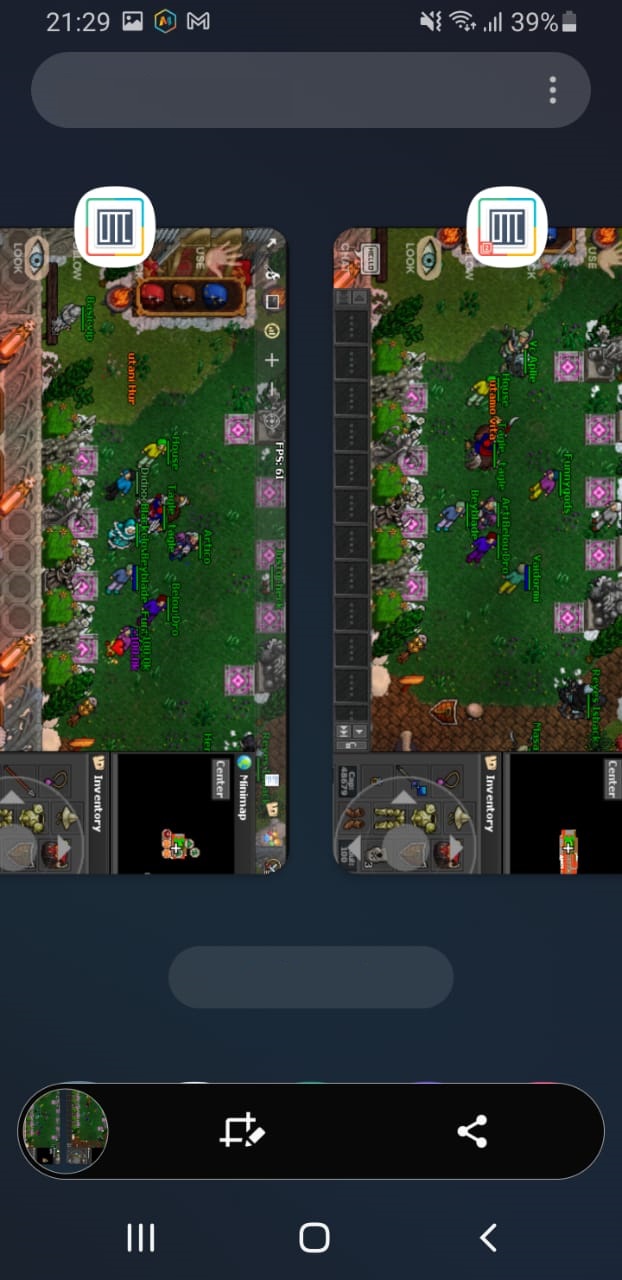
Setting multi client for mobile
MultiClient Guide

Ready to run MultiClient on your Android phone? It's simple, follow these steps to get started:
1) Go to the Play Store: On your Android device, open the Play Store.

2) Download "DO Multiple Space". It's your gateway to launching MC. You can search for it in the Play Store or click the link to open it in a new tab.

3) Once installed, open the app and look for the "+" symbol at the bottom right corner of your screen. Tap on it!

4) Find Tibia Canob in your app list and add it to DO Multiple Space. This will make MC ready to roll.

5) Just tap on Tibia Canob, and MC will start automatically.

Repeat the process from pressing the "+" symbol to add more mcs. How cool is that?


186885
140502
Players
Accounts
Welcome, Vanizada!
Newest player
664,3b
631,9b
499,7b
280,6b
265,1b
255,7b
218,1b
207,5b
194,0b
184,8b